
11 Best Circle Alternatives for Community Platforms in 2026
Not Just Chat Rooms: The Best Platforms for Paid Communities


Algorithms are flaky, attention is rented, and creators are finally realizing that owning an online community is the real power move.
Modern community platforms give creators the tools to drive real engagement, host discussion forums and group chat, run live events, and actually monetize through memberships, online courses, and built-in gamification like points and leaderboards.
That’s why Circle has become a go-to name in community building, offering a polished, custom-branded experience that keeps audiences engaged and paying.
Circle’s community model blends structure, customization, and scalability in a way that appeals to serious creators and course builders.
In this article, we’ll break down what Circle does well, where it falls short, and the best Circle alternatives to consider if you’re looking for a community platform that fits your goals better.
What Is Circle?

Circle is an all-in-one community and marketing platform launched in 2019 by Sid Yadav, with early backing from Teachable founder Ankur Nagpal.
Its mission is simple but ambitious: help creators build meaningful, owned communities outside of noisy social platforms.
The platform blends discussion forums, live events, courses, and memberships into a single, Slack-meets-Notion-style experience.
Over time, it’s evolved from “just a community tool” into a broader ecosystem aimed at creators who want more control over engagement and monetization.
That evolution leads directly into what Circle does best—creating an engaging online community experience that feels intentional instead of chaotic.
What Makes Circle Stand Out?
Clean, Intuitive UI/UX
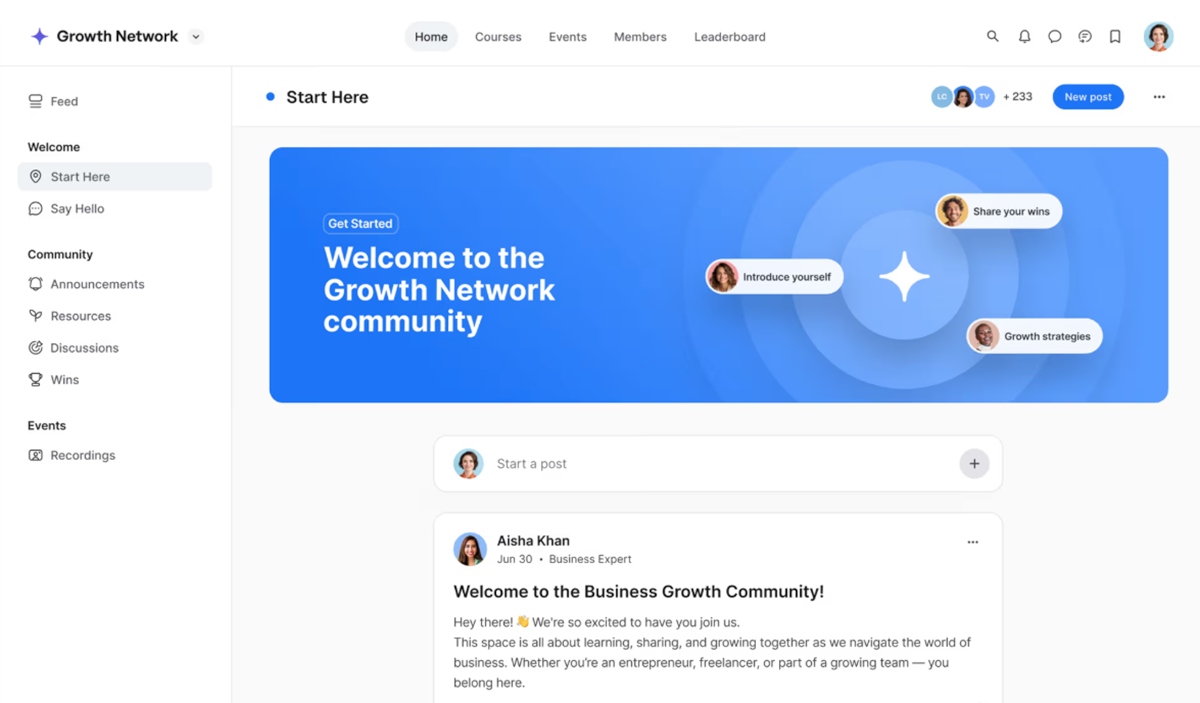
Circle’s interface is one of its biggest flexes. It’s sleek, modern, and immediately familiar if you’ve ever used tools like Slack, Discord, or Notion.
Everything feels intentionally designed, from the sidebar layout to how spaces and conversations flow, which makes onboarding new members way less intimidating.
Compared to other community platforms, Circle feels calmer and more intuitive. Meaning members spend less time figuring out where to click and more time actually engaging
Space-based Community Structure
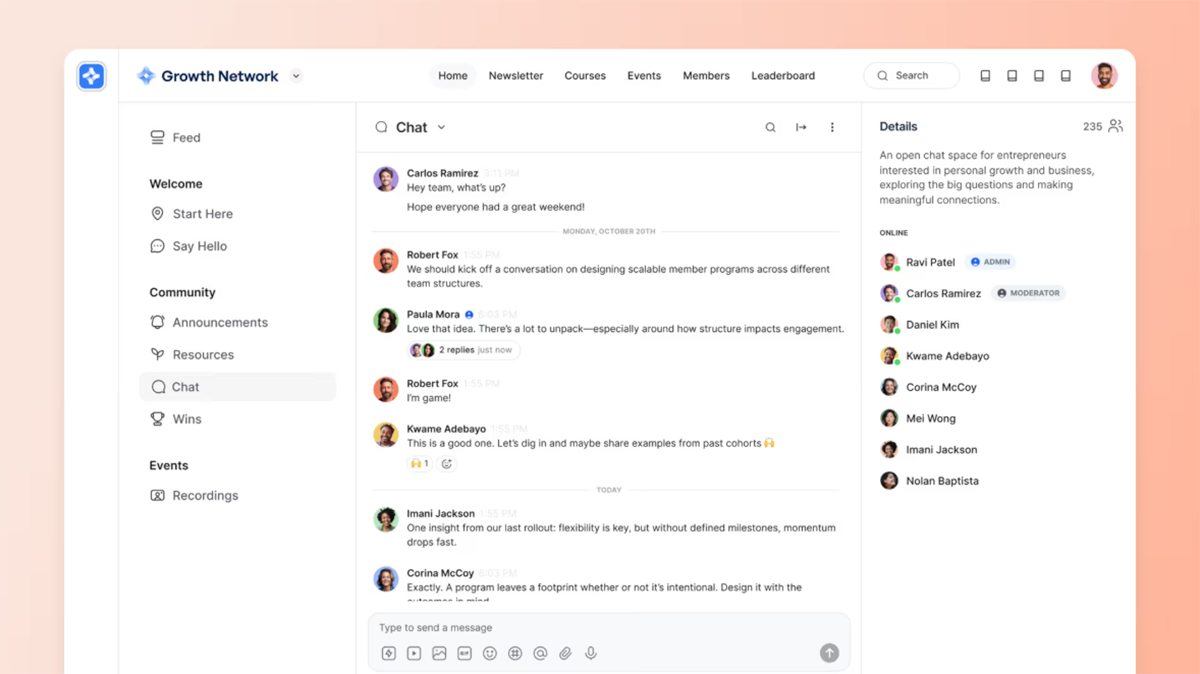
Circle organizes every online community into clearly defined spaces, such as Posts, Events, Chat, or Courses, which makes community management and access control incredibly clean.
This structure helps creators segment conversations, lock content behind memberships, and guide members toward the right discussions without overwhelming them.
While you can’t mix content types inside a single space, the trade-off is a more organized, distraction-free experience that scales well as your community grows.
Built-in Courses
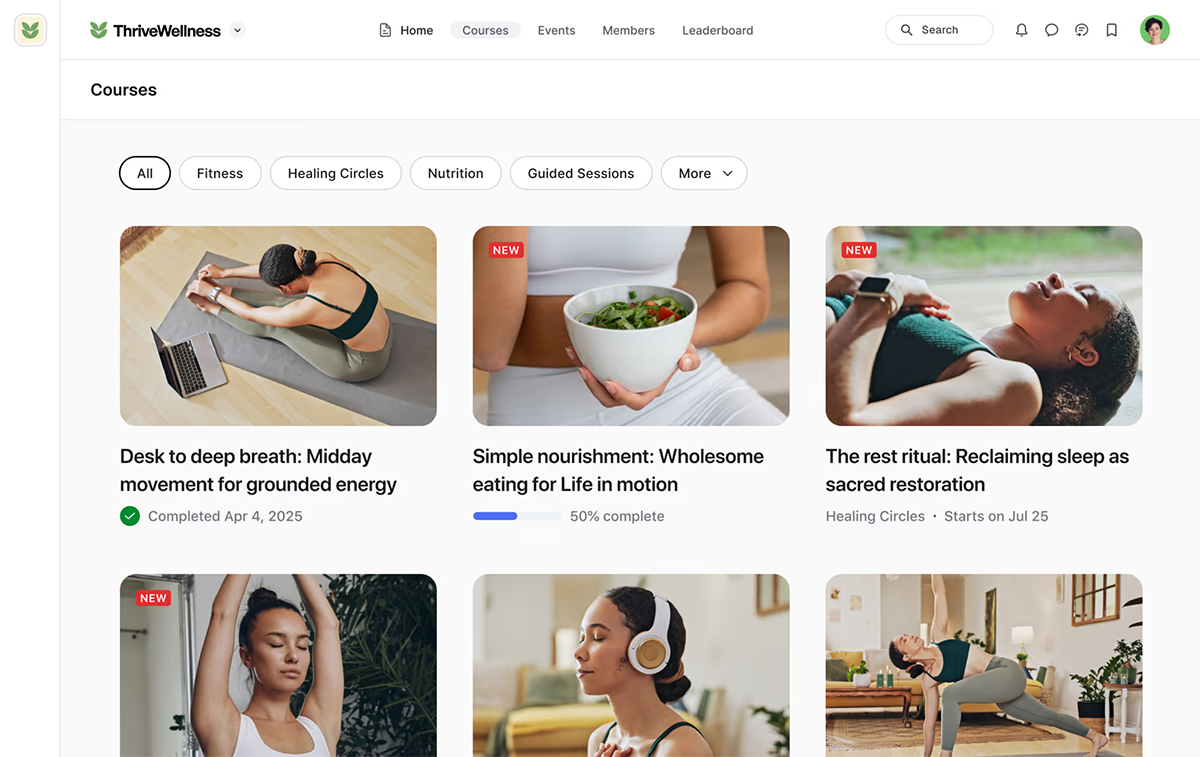
Circle lets course creators run self-paced, structured, or scheduled online courses directly within their community, keeping learning and conversation in one place.
Lessons support rich content blocks, embeds, and AI-generated video transcripts, which make long-form education easier to consume and revisit.
While it doesn’t replace a full LMS with certifications and advanced assessments, it’s a strong option for creators who want course creation tightly connected to real-time discussion and ongoing community engagement.
Live Events & Livestreaming

Circle comes with built-in live events and livestreaming, allowing creators to host interactive calls with up to 30 participants or broadcast events to up to 1,000 members.
You can schedule one-time or recurring sessions with ease, making it a strong fit for masterminds, office hours, AMAs, and live workshops.
With optional integrations for Zoom and Google Meet, Circle gives creators flexibility while keeping events anchored inside their community.
Automation Workflows (Business Plan+)
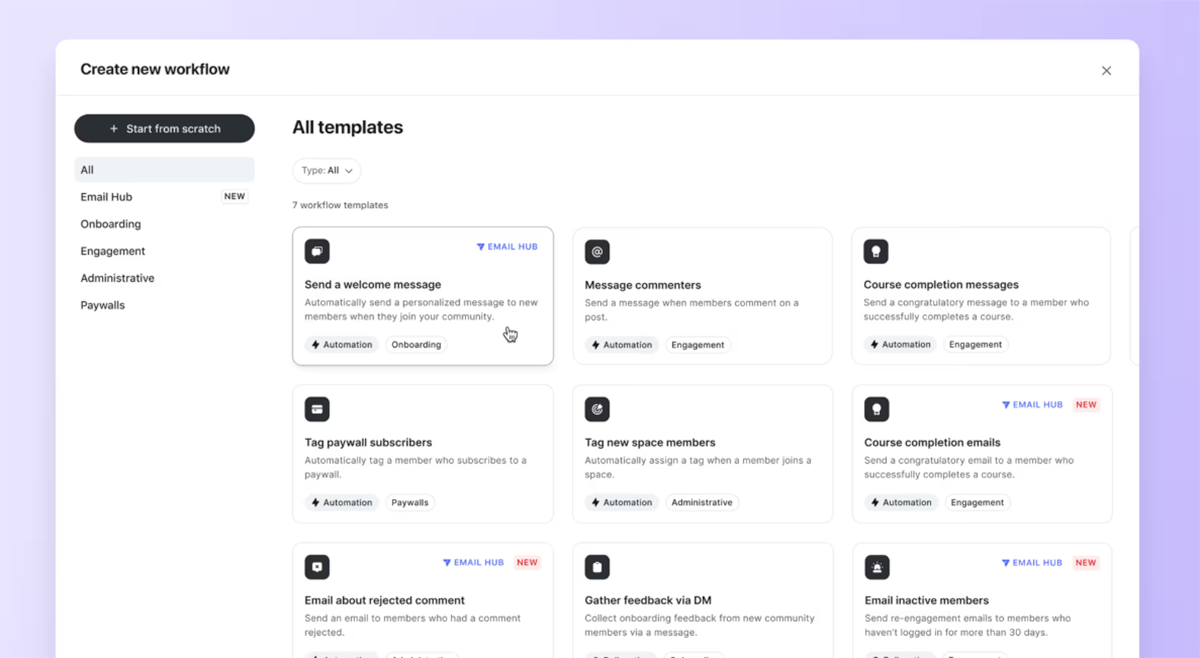
Circle’s automation workflows feel like a built-in, creator-friendly version of Zapier, letting you automate key community management tasks without relying on external tools.
You can tag members, trigger direct messages, unlock spaces, send event reminders, and run bulk actions based on member behavior or purchases.
The catch is that these powerful workflows are locked behind Circle’s Business plan at around $199/month, which can be a tough pill to swallow for smaller creators.
Gamification & Activity Scores

With Circle 3.0, the platform introduced full gamification features, including points, levels, leaderboards, and activity scores that track how members engage across the community.
Creators can reward participation for things like posting, attending live events, or completing courses, making engagement feel fun and intentional.
These systems help surface your most active members and significantly boost long-term retention by giving people a reason to keep showing up.
Mobile Apps (iOS & Android)
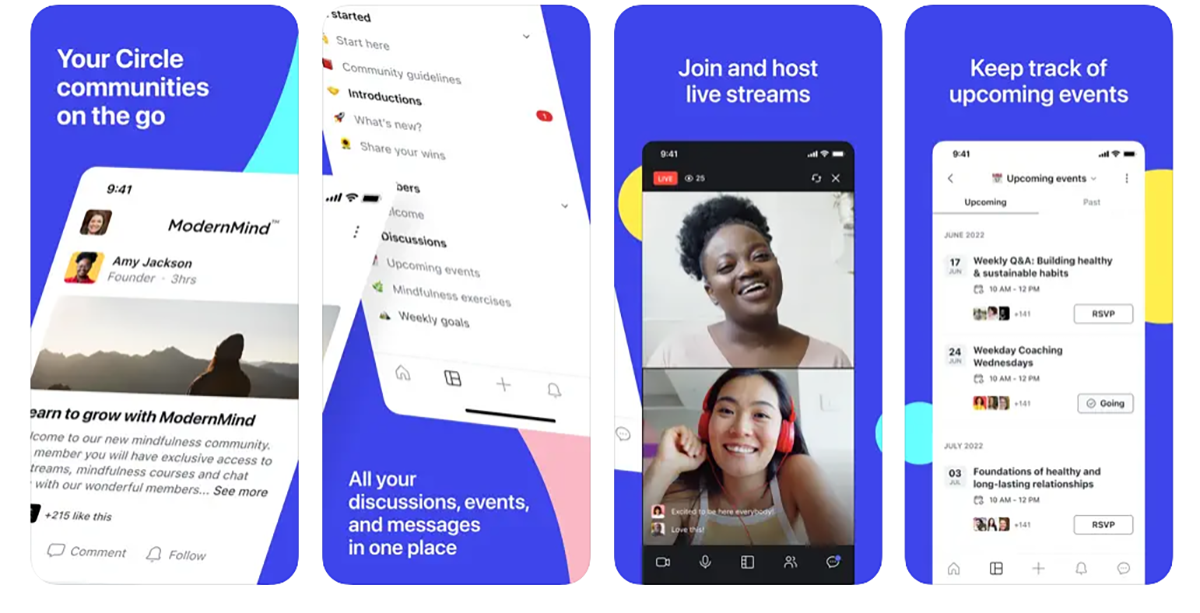
Circle’s mobile app experience brings the entire community to your members’ pockets, with full support for courses, events, chats, notifications, and even in-app livestreaming.
Push notifications make a considerable difference for engagement, pulling members back into conversations and live sessions far more reliably than email alone.
It’s especially effective for keeping momentum going between events and encouraging daily check-ins without relying on social media algorithms.
Pricing (The Quick Reality Check)
Circle positions itself as a premium community platform, and the pricing reflects that.
Costs climb quickly once you unlock more advanced tools.
And while the entry plan covers the basics of community building, many of Circle’s most powerful features live on higher tiers, and transaction fees apply on top of Stripe’s processing costs.
Here's Circle pricing breakdown:
- Professional: $89/month (billed annually) — Includes core community features like discussions, online courses, live events, livestreaming, custom branding, paid memberships, gamification, a website builder, and reporting. This plan works best for solo creators or small communities getting started.
- Business: $199/month (billed annually) — Adds automation workflows, custom profile fields, branded email notifications, activity scores, AI-powered content tools, and API access. This is the plan most growing creators need—but it’s also where pricing jumps significantly.
- Enterprise: $419/month (billed annually) — Designed for large communities and organizations, this plan includes unlimited workflows, AI agents, advanced analytics, custom SSO, priority support, lower transaction fees, and higher admin and moderator limits.
- Plus Branded App: Custom Pricing — Offers fully white-labeled iOS and Android apps, branded push notifications, in-app purchases, a dedicated launch team, and concierge onboarding. Pricing is custom and typically aimed at enterprise-level businesses.
Important Pricing Note: Circle charges a transaction fee of up to 2% on payments, in addition to Stripe's fees. Features like email marketing and branded mobile apps are add-ons, which can push total costs higher than expected.
Why You Might Want a Circle Alternative
Circle is a strong player in the online community space, but it’s not great for all creators.
For many, the limitations start to show once they move past basic community building and begin layering in growth, sales, and long-term monetization strategies.
Here are some reasons why you might want to look for a different platform:
💰 It Gets Expensive Fast
Circle’s lower-tier paid plans cover the basics, but essential features like automation workflows, deeper customization, and white-label or branded community options are locked behind expensive upgrades.
For creators still validating their audience, paying enterprise pricing before enterprise revenue exists can feel like paying enterprise pricing before enterprise revenue exists.
📧 Email Marketing Costs Extra, and It’s Pretty Basic
While Circle offers built-in email marketing, it comes at an additional cost and lacks the advanced segmentation, testing, and analytics found in dedicated tools.
Compared to platforms that bundle email with memberships and courses, Circle’s approach adds friction to scaling a Circle community.
💳 Hidden Transaction Fees
Circle applies a platform transaction fee on top of Stripe’s processing costs, which isn’t always obvious upfront.
Once you’re selling memberships or online courses, those fees can quietly eat into your margins.
📚 Limited Product Types
Circle is optimized for communities and courses, but it falls short if you want to sell beyond those use cases.
Digital downloads, physical products, or bundles require outside tools, making the tech stack more complex for creators trying to diversify revenue.
🛒 Checkout and Growth Tools are Lacking
There’s no native support for PayPal, order bumps, upsells, or sales funnels, which limits how effectively you can optimize conversions.
If you care about growth mechanics as much as community engagement, alternatives like Fourthwall or other creator-first platforms built for monetization may be a better fit.
Overall Thoughts
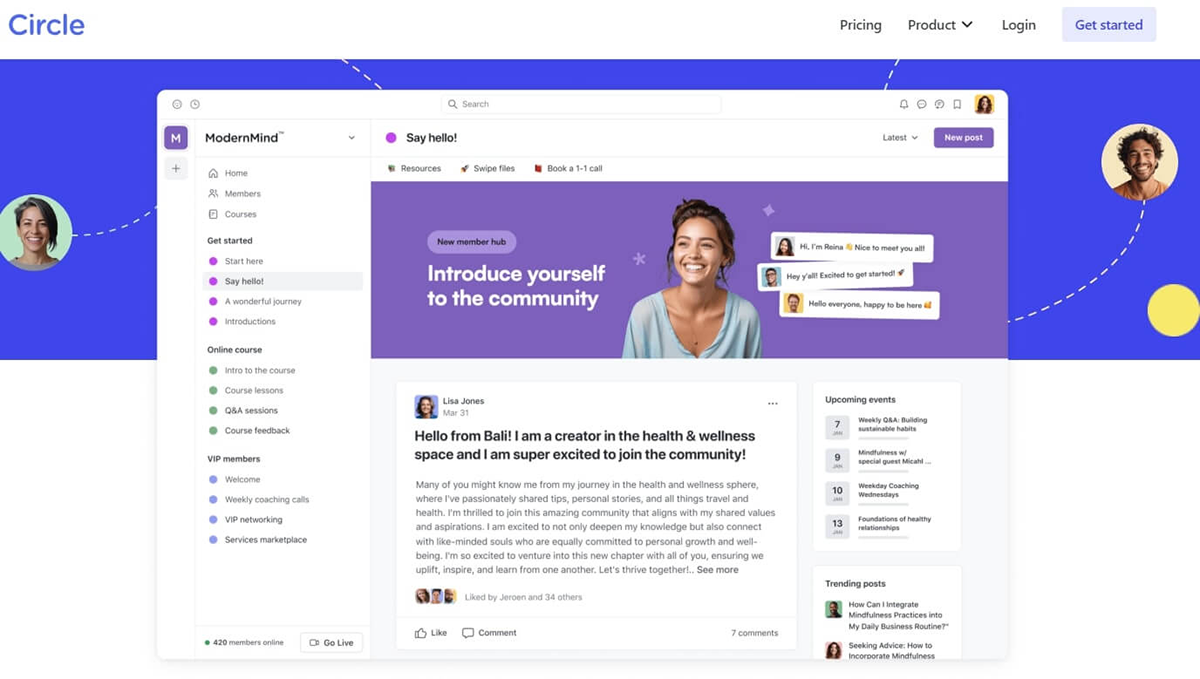
Circle is a genuinely strong community platform, and in many ways, it sets the standard for what a modern online community should feel like.
Its polished interface, thoughtfully designed community tools, and features like live events, gamification, and structured discussion spaces make it easy to drive consistent community engagement.
For creators who already have an audience and want to scale a paid, premium community built around conversations, memberships, and light course creation, Circle delivers a reliable, professional experience.
Where Circle starts to fall short is when creators want their community to be just one part of a larger business.
The added costs around email marketing, transaction fees, and limited product types can make monetization feel fragmented over time.
In short, Circle is excellent if your community is the product. However, if your goal is to scale a creator brand with multiple revenue streams, flexible monetization, and fewer moving parts, exploring alternatives may be the smarter long-term play.
Top Circle Alternatives for Scaling Communities
1. Fourthwall

Fourthwall is built for creators who want their online community, content, and monetization to live in one place.
You can run memberships, host exclusive video and audio content, send direct messages, and engage fans through polls, badges, and members-only perks—all from a fully customizable, no-code website.
Unlike traditional discussion-forum platforms, Fourthwall centers community engagement around content, access, and connection rather than endless threads.
Creators can communicate directly with members through DMs, email, and push notifications, making it easier to nurture relationships and drive retention.
It also has built-in analytics to help track subscriber growth and engagement, enabling intentional, data-driven scaling of your community.
Combined with flexible monetization tools and a branded mobile app, Fourthwall offers a community experience that grows alongside your creator business instead of limiting it.
💰 Pricing
- Free Plan: $0/month — 5% fee on digital product and membership sales. Includes website builder, storefront, memberships, digital downloads, tipping, integrations, and a fully branded mobile app.
- Pro Plan: $19/month or $180/year — Removes platform fees on digital sales, adds a free custom .store domain, $10/month merch sample credit, advanced analytics, unlimited team members, and priority creator support.
✅ Pros
- All-in-one creator platform combining community building, commerce, and content
- Membership tiers with exclusive posts, videos, courses, and perks
- Sell unlimited digital products (eBooks, templates, videos, art, presets, and more)
- Built-in print-on-demand merch with automated fulfillment
- 0% fees on physical merch, even on the free plan
- Integrated tips, donations, fan messaging, and email marketing integrations
- Deep integrations with YouTube, TikTok Shop, Twitch, and Discord
- Fully branded mobile app included with memberships
❌ Cons
- More feature-rich than some platforms, which means a slightly steeper setup curve
- Not ideal for creators who only want a lightweight, Slack-style discussion forum without commerce tools
2. Discord

If your goal is to build a fast-moving, highly social online community, Discord is one of the most accessible platforms out there.
It’s built around real-time group chat, voice channels, and live interactions, making it especially popular for gaming communities, tech circles, and creator fandoms where constant conversation fuels engagement.
Unlike Circle’s structured approach with courses and gated spaces, Discord feels more casual and spontaneous.
Members hop in to chat, share updates, or join live voice conversations without friction. This makes Discord excellent for community building and maintaining daily interaction, but less ideal as a standalone platform for structured programs or long-term monetization.
But where it really shines is accessibility and scale. It’s free to set up, works seamlessly across desktop and mobile devices, and supports massive servers with dedicated moderators, roles, emojis, and custom channels.
That said, most creators use Discord alongside other tools, handling monetization, email marketing, and content delivery elsewhere, while Discord serves as the community's social heartbeat.
💰 Pricing
- Free Plan: $0/month — Unlimited text, voice, and video chat, 25MB uploads, basic custom emojis, and full access to core server features.
- Nitro Basic: $2.99/month or $29.99/year — Adds 50MB uploads, custom emojis and stickers across servers, custom app icons, and a Nitro badge.
- Nitro: $9.99/month or $99.99/year — Includes 500MB uploads, HD video streaming (up to 4K/60fps), server boosts, animated profiles, longer messages, and access to exclusive activities.
✅ Pros
- Excellent for real-time community engagement via chat, voice, and video
- Free and easy to launch, with massive adoption across creator audiences
- Works well on desktop and mobile, keeping communities connected anywhere
- Flexible moderation tools, roles, emojis, and integrations with platforms like YouTube and Podia
- Great companion tool for creators who already monetize elsewhere
❌ Cons
- Not designed for monetization out of the box—no native support for courses, digital products, or storefronts
- Lacks structured discussion forums and long-form content organization
- Requires external tools for websites, email marketing, and memberships
- Can feel chaotic without strong moderation and clear channel organization
3. Mighty Networks

Mighty Networks is built for creators who want their online community to feel less like a static forum and more like a living social platform where members show up daily.
The platform brings together groups, events, livestreams, challenges, and online courses into one cohesive, branded environment designed to spark ongoing interaction.
Members can post updates, comment in discussions, RSVP to events, join live sessions, and progress through courses, all within a social-feed-style interface that rewards consistency and participation.
This structure naturally encourages repeat visits and deeper community engagement, especially for creators running cohort-based programs or interactive memberships.
For those focused on scaling interaction, relationships, and peer-to-peer activity, Mighty Networks excels as a community-first ecosystem rather than a passive content hub.
💰 Pricing
- Community Plan: $49/month — Includes groups, posts, events, livestreaming, payments, and core community-building tools.
- Courses Plan: $129/month — Adds structured course creation, cohort-based learning, and interactive course experiences.
- Business Plan: $229/month — Unlocks deeper customization, advanced analytics, marketing tools, and automation features.
- Growth Plan: $430/month — Built for scaling communities with premium analytics, higher limits, and branded mobile app access.
- Mighty Pro: Custom Pricing — A fully white-labeled, enterprise-level mobile app experience with strategic support and custom features.
✅ Pros
- One of the strongest platforms for community engagement, with posts, polls, events, challenges, and livestreams
- Designed to encourage daily interaction instead of one-off visits
- Supports hybrid models that combine memberships, communities, and online courses
- Option for a fully white-labeled mobile app that delivers a premium, brand-owned experience
- Excellent replacement for creators moving away from Facebook Groups or Discord-style setups
❌ Cons
- Interface can feel busy or overwhelming compared to Circle’s cleaner UI
- Pricing scales quickly as you unlock advanced features
- Not designed for selling merch, digital downloads, or running a broader commerce-based creator business
4. Podia

Instead of leading with discussion forums, Podia focuses on helping creators sell online courses, digital downloads, memberships, and coaching, while still offering lightweight community features to keep audiences connected.
Everything is designed for speed and clarity: you can launch products, send emails, build landing pages, and manage members without plugins, coding, or a complicated setup.
Compared to Circle, Podia is far more business-first, making it ideal for creators who care about monetization and operations just as much as community engagement.
While its community tools aren’t as immersive or social as Circle’s, Podia shines as a practical, all-in-one foundation for scaling a creator business.
💰 Pricing
- Free Plan: $0/month — Sell products with a 10% transaction fee, including access to the site builder, communities, courses, and basic email marketing.
- Mover: $39/month ($33/month billed annually) — Unlimited products, upsells, coupons, email campaigns, and a reduced 5% transaction fee.
- Shaker: $89/month ($75/month billed annually) — Removes transaction fees entirely and adds affiliate marketing, bundles, webinars, course certificates, PayPal support, and advanced selling tools.
- Earthquaker: $199/month ($166/month billed annually) — Built for scaling teams, with additional admin seats, priority support, onboarding calls, and expanded customization.
✅ Pros
- True all-in-one platform for digital products, memberships, communities, and courses
- Extremely beginner-friendly with almost no learning curve
- Built-in email marketing, automations, coupons, and affiliate tools
- Excellent value compared to managing multiple third-party tools
- No transaction fees on mid-tier plans and above
❌ Cons
- Community features are basic compared to Circle or Mighty Networks
- Course builder lacks advanced LMS features like deep analytics or gamification
- No dedicated mobile app for members
- Website customization is limited compared to more design-heavy builders
- Not designed for selling physical products or merch
5. Disciple

Imagine pulling your community out of algorithm chaos and dropping it into its own private social network—that’s exactly what Disciple is built to do.
It gives creators, coaches, and brands full control over a branded community experience, complete with custom colors, layouts, feeds, and native iOS and Android apps that feel like a standalone social platform.
Unlike Circle’s web-first approach, Disciple is unapologetically mobile-centric, leaning into push notifications, in-app messaging, livestreams, and personalized feeds to drive daily engagement.
Members can join groups, follow topics, watch content, participate in discussions, and message each other without ever touching a third-party social app.
For communities that thrive on routine interaction and strong brand identity, Disciple offers a polished, app-first alternative to Circle.
💰 Pricing
- Branded App: $399/month (annual) or $469/month (quarterly) — Includes a branded mobile app and web version, unlimited members, and core community features.
- Branded App Plus: $599/month (annual) or $699/month (quarterly) — Removes all Disciple branding for a fully white-labeled experience.
- Branded App Pro: $999/month (annual) or $1,169/month (quarterly) — Unlocks advanced features like unlimited admins and groups, unlimited monetizable courses, multi-host livestreaming, API access, multi-tier pricing, branded member support, and 20,000 video minutes.
- Organization: Custom Pricing (typically $4,000+/month) — Enterprise-grade solution with bespoke development, enhanced security, migrations, strategic sessions, and dedicated support.
✅ Pros
- Fully branded mobile apps that feel like your own private social network
- Strong mobile engagement via push notifications, livestreaming, and DMs
- Clear monetization paths with subscriptions, courses, and in-app purchases
- Robust group segmentation and permission controls
- Ideal for creators and brands escaping algorithm-driven platforms
❌ Cons
- Pricing escalates quickly, especially for white-label and Pro tiers
- Some features are app-only, limiting flexibility for web-first communities
- More complex and costly than standard community builders like Circle
6. Swarm
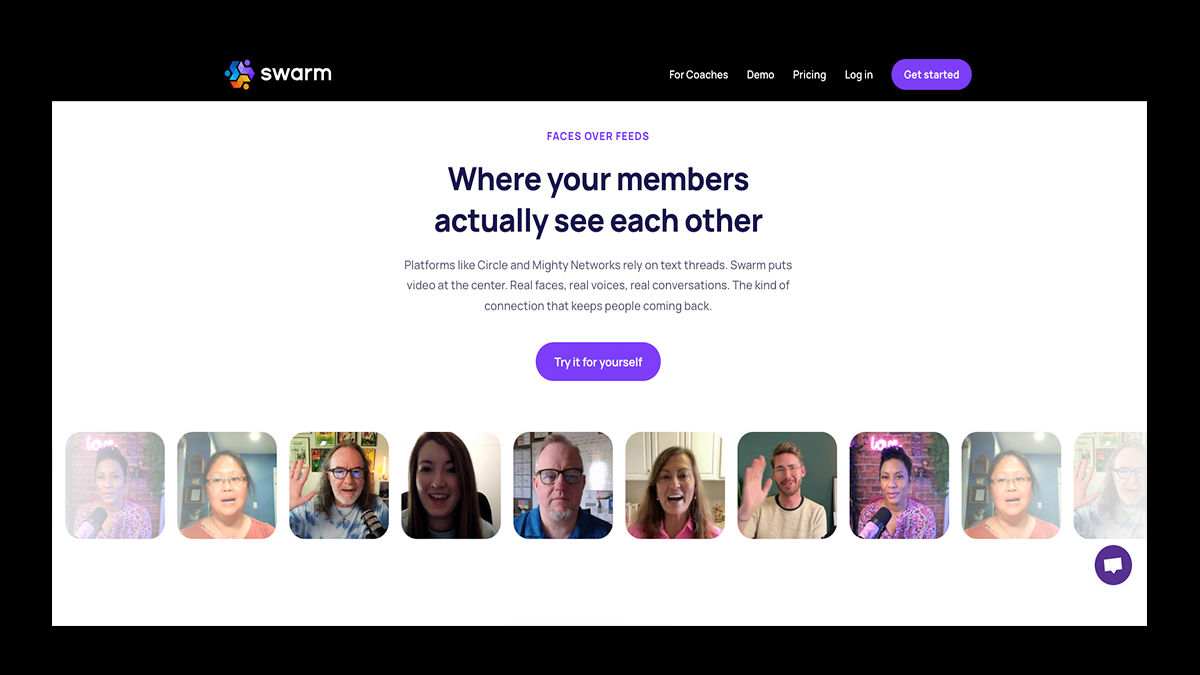
Swarm takes a video-first approach to community building, designed to create smaller, more intentional spaces where members actually recognize each other and participate consistently.
Instead of endless text threads or sprawling forums, Swarm centers engagement around rich video messages, live video sessions, and face-to-face interaction that feels personal and human.
This makes it especially effective for coaches, educators, and creators who want to nurture trust, retention, and meaningful dialogue—not just inflate member counts.
Where Circle focuses on structure and scalability, Swarm focuses on depth. It offers tools such as live video, screen sharing, courses, calendars, private messaging, AI-assisted content creation, and automatic transcription, all built to reduce friction and keep conversations flowing.
Monetization is also built in, with support for selling courses, memberships, digital downloads, live events, and private sessions—making Swarm more revenue-capable than many niche community platforms.
While it’s not designed for massive, forum-style communities, Swarm excels when the goal is high engagement, stronger relationships, and communities that actually stick.
💰 Pricing
- Launch: $19/month — Supports up to 1,000 members and core community features.
- Growth: $79/month — Expands capacity to 5,000 members with additional tools for scaling engagement.
- Scale: $149/month — Unlimited members with full access to Swarm’s feature set.
✅ Pros
- Video-first design that drives more authentic, human engagement
- Excellent for coaches, educators, and creators running intimate communities
- Built-in tools for live video, courses, events, screen sharing, and private messaging
- Supports monetization through memberships, courses, downloads, and sessions
- Strong analytics and transcriptions that improve accessibility and retention
❌ Cons
- Not ideal for large, forum-style, or text-heavy communities
- Less suited for creators who want passive content consumption
- Learning curve due to its video-centric workflow
- Not built for merch stores or large-scale eCommerce ecosystems
7. Bettermode
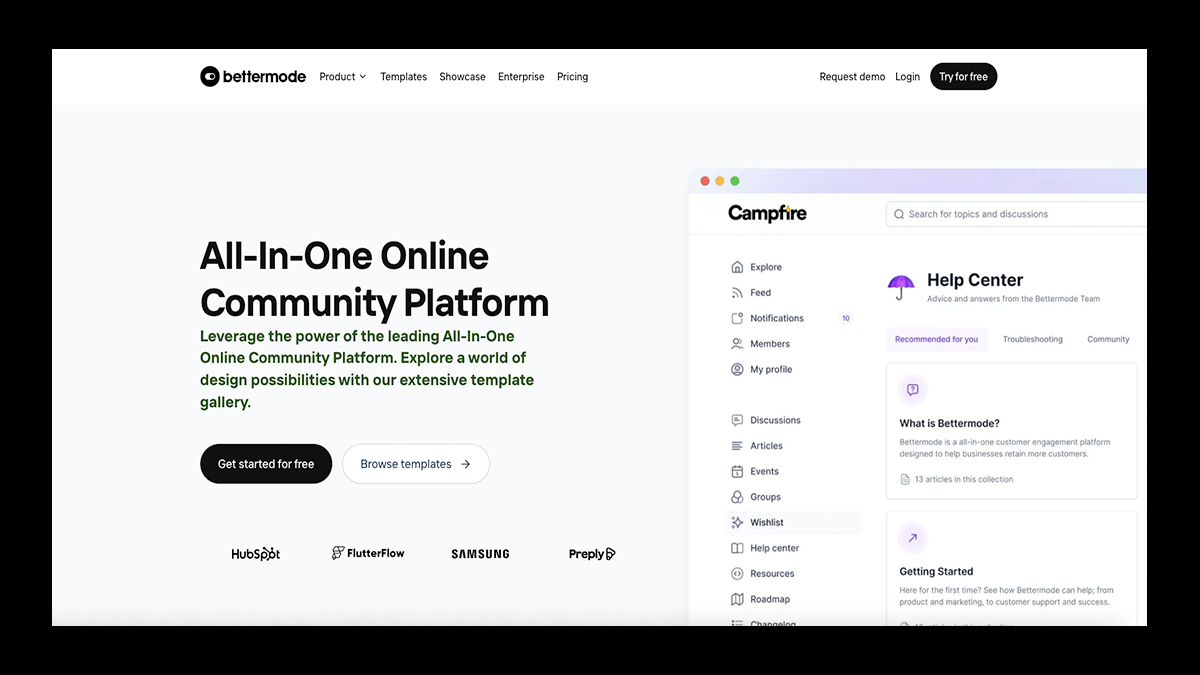
Bettermode is a strong alternative for brands and SaaS companies that treat community as a support and engagement layer rather than a monetized product.
It’s designed to help businesses centralize discussion forums, product updates, Q&A, changelogs, job boards, and help centers into one highly customizable community hub.
With pre-built templates and modular spaces, teams can quickly launch customer-facing communities that encourage feedback, upvoting, knowledge sharing, and peer-to-peer support.
Bettermode excels at structured community management, detailed member profiles, tagging, badges, and private or public spaces, but it’s clearly built for customers, not creators selling access.
As a result, it’s best suited for teams with technical resources and an existing product ecosystem rather than solo creators.
💰 Pricing
- Free Plan: $0/month — Includes a Bettermode subdomain, up to 100 members, 20 spaces, 1,000 monthly email credits, 1 translation locale, and 1GB storage.
- Pro Plan: $59/month ($49/month billed annually) — Unlimited members, 20 spaces, 5 collaborators, 10,000 monthly email credits, 25GB storage, and 2 translation locales.
- Enterprise: Custom Pricing — Advanced security, custom integrations, and tailored features for larger organizations.
✅ Pros
- Excellent for customer support, feedback loops, and knowledge bases
- Highly customizable layouts with forums, Q&A, leaderboards, upvotes, and resource centers
- Free plan makes it easy to test with small communities
- Strong moderation, tagging, and member profile tools
- Works well as a branded customer hub alongside an existing product
❌ Cons
- No native support for paid memberships or selling community access
- Cannot sell digital products or courses without third-party tools
- No built-in website or storefront builder
- Less creator-friendly compared to Circle or Fourthwall
- Requires integrations (Zapier, custom setups) for monetization workflows
8. Hivebrite

Hivebrite is a powerful, enterprise-grade alternative to Circle built for large organizations that need structure, security, and scale.
It offers advanced member directories, multi-tier segmentation, job boards, event management, donation tools, and detailed access controls—far beyond what a typical community platform offers.
Hivebrite gives organizations deep customization over branding, onboarding flows, user roles, and visibility rules, making it ideal for associations, alumni networks, and multi-chapter communities.
With white-label web and mobile apps, CRM integrations, SSO, and API access, it’s designed to manage complex communities with precision.
While it’s overkill for most creators, Hivebrite excels when a community needs governance and infrastructure, not creator-style monetization.
💰 Pricing
- Custom Pricing: (Estimated from ~$799/month and up) — Hivebrite does not publicly list pricing. Costs vary significantly based on features, scale, integrations, and support needs, with higher tiers running well into four figures per month.
✅ Pros
- Enterprise-grade platform built for associations, alumni networks, and global organizations
- Advanced admin controls, permissions, and member segmentation
- Advanced directories, job boards, event management, ticketing, and fundraising tools
- Fully customizable, white-label experience with branded mobile apps
- Strong support for SSO, CRM integrations, APIs, and multi-chapter communities
❌ Cons
- Far too expensive for individual creators or small teams
- Requires onboarding and often technical expertise to configure properly
- Analytics can feel underwhelming relative to the price point
- Not designed for creator-style monetization (no digital products, merch, or simple memberships)
9. Kajabi

While Kajabi is best known for its powerful course builder, email marketing, and automated sales funnels, it also includes native community features that let members comment on posts, participate in discussions, and engage around course content.
These community spaces are typically tied to products or programs, making them especially effective for cohort-based courses, coaching groups, and memberships where conversation supports learning.
Unlike Circle or Mighty Networks, Kajabi’s community tools aren’t designed to be a standalone social feed, but they work well when paired with structured content and guided experiences.
For creators who want community baked into a larger monetization and education system, Kajabi offers a clean, business-first approach that prioritizes outcomes over constant chatter.
💰 Pricing
- Basic: $149/month — Ideal for launching your first products, with core course tools, email marketing, automations, and sales funnels.
- Growth: $199/month — Adds advanced automations, affiliate marketing, more products, and higher contact limits—perfect for creators scaling up.
- Pro: $399/month — Built for established brands managing multiple sites, teams, and high-volume programs with deeper customization.
- Enterprise / Plus Branded App: Custom Pricing — Includes Kajabi’s full feature set, branded mobile app, premium onboarding, and priority support.
✅ Pros
- Replaces multiple tools for LMS, email marketing, funnels, automations, and landing pages
- One of the strongest course builders available, with quizzes, drip schedules, coaching, and cohort features
- Built-in memberships, subscriptions, upsells, and podcast hosting
- Polished infrastructure with a solid mobile app and reliable hosting
- Powerful analytics and 24/7 customer support
❌ Cons
- Higher price point compared to most community platforms
- Community features feel secondary compared to Circle or Mighty Networks
- Limited design flexibility on lower-tier plans
- Overkill for creators who only want a simple community or discussion-focused space
10. Facebook Groups

Facebook Groups are one of the original online community tools, and for many creators, they’re often the first place a community ever lives.
They’re easy to set up, familiar to most users, and designed around a social feed where members can post updates, ask questions, comment, share files, vote in polls, join events, and watch live videos.
Because Facebook already has massive built-in distribution, Groups can grow quickly through search, recommendations, and invites, making them useful for reach and early community building.
For creators who want a zero-cost way to gather people around a shared interest, Facebook Groups still get the job done.
💰 Pricing
- Free to Use: $0/month — Anyone can create or join Facebook Groups at no cost.
✅ Pros
- Completely free to use with a very low barrier to entry
- Massive built-in audience and organic discovery through Facebook search
- Familiar interface with posts, comments, live video, events, polls, and file sharing
- Easy to launch and manage without technical setup
❌ Cons
- No native support for paid access, memberships, or selling products
- You don’t own your audience or member data
- Content competes with ads, sponsored posts, and algorithm changes
- No way to export members or communicate with them outside of Facebook
11. Slack
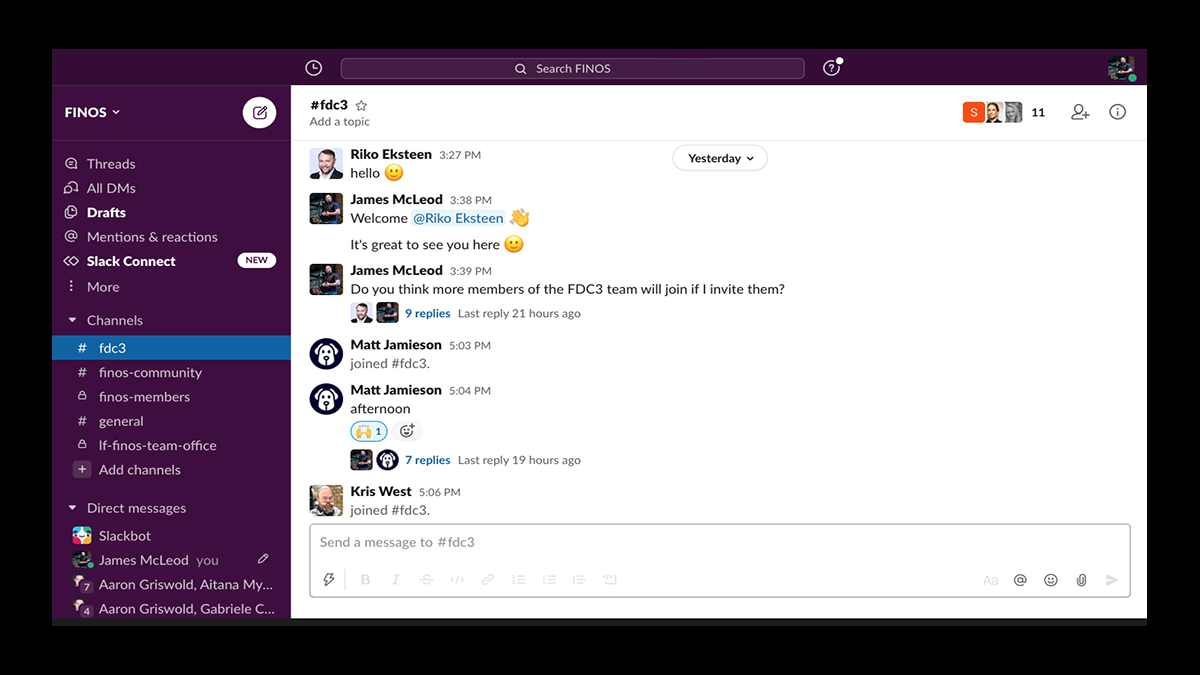
Slack isn’t a traditional community platform, but for professional groups, founder collectives, and paid masterminds, it can still function as a Circle alternative in the proper context.
Originally built as a team communication and productivity tool, Slack excels at real-time collaboration through channels, direct messages, audio/video huddles, and shared documents.
Communities built on Slack tend to feel focused and intentional, with conversations happening in clearly defined channels rather than noisy social feeds.
For creators running business-oriented communities or internal networks, Slack offers a familiar, low-friction environment that encourages daily participation.
💰 Pricing
- Free Plan: $0/month — Limited message history, basic app integrations, and audio/video meetings.
- Pro: $8.75/user/month — Full message history, unlimited integrations, group video calls, and collaborative lists and documents.
- Business+: $18/user/month — Advanced security, SSO, and data export capabilities.
- Enterprise Grid: Custom Pricing — Built for large organizations with compliance, data protection, and enterprise-level administration.
✅ Pros
- Excellent real-time communication with channels, DMs, and live huddles
- Familiar interface for professionals and teams
- Strong integrations with third-party productivity tools
- Free plan lowers the barrier to launching a community
- Less algorithm-driven noise compared to social platforms
❌ Cons
- Not designed for creator monetization or audience growth
- Limited branding and customization options
- It can become overwhelming in larger communities
- Lacks structured discussion forums, courses, or membership tools
- Better suited for teams than creator-led communities
Turn Your Community Into a Business, Not Just a Chat Room
Circle is great at hosting conversations, but building a sustainable creator business takes more than clean discussion spaces.
Once monetization, ownership, and scale enter the picture, Circle often requires extra tools, higher plans, and added fees just to keep up.
Fourthwall flips that model by putting community, content, and commerce in one place from day one—no upfront costs, no duct-taped stack, and no sacrificing control.
With built-in memberships, digital products, merch, tipping, and direct fan engagement, Fourthwall turns your audience into a real revenue engine.
If you want a platform that grows with your community and actually supports you financially, Fourthwall is where you should start.
FAQ: Circle Alternatives & Community Platforms
What is the best alternative to Circle for monetization?
If monetization is your priority, Fourthwall stands out as one of the strongest Circle alternatives.
Unlike a traditional circle community, Fourthwall is built to help creators monetize through memberships, digital products, merch, and tipping, all without relying on expensive paid plans.
It’s ideal for creators who want their community to function as a real revenue engine, not just a discussion space.
Is Circle worth it for small creators just starting out?
Circle can be powerful, but for small creators, it often feels expensive early on.
Key features like automation, email tools, and advanced customization are locked behind higher-priced plans, which can slow down growth before monetization kicks in.
Many creators start with lighter tools, or platforms like Fourthwall or Podia, before committing to Circle long term.
Can you monetize a Discord or Slack community like Circle?
Not natively. Platforms like Discord and Slack excel at real-time group chat, but monetization requires third-party tools and workarounds.
They’re great for engagement and communication, but weaker for subscriptions, product sales, or long-term business growth compared to Circle or creator-first platforms.
What platform is best for large or enterprise communities?
For large organizations, Hivebrite is a more suitable Circle alternative.
It offers advanced directory features, permissions, white-label branding, job boards, events, and donation tools. That said, Hivebrite is overkill for creators and small teams.
Which Circle alternative is best for creators who want simplicity?
If you want an easy setup with minimal friction, Podia is a solid choice.
It combines products, email marketing, and light community features into a single dashboard, making it beginner-friendly.
The trade-off is that Podia’s community tools are simpler and less immersive than those of Circle or Mighty Networks.
Matt Keyser is a writer at Fourthwall who lives at the intersection of social media and Creator culture. With 4+ years of experience covering industry trends, his work focuses on helping Creators and brands understand how to turn their passion into a thriving business while maintaining a constant pulse on the latest eCommerce and social media trends.


You might also like

8 Best TeePublic Alternatives for Artists in 2026

9 Best Printify Alternatives for Print-on-Demand in 2026

8 Best Spring (Teespring) Alternatives for Creators After Its Shutdown

30 Best Print on Demand Products for Creators in 2026 (From Tees to Plushies)

9 Best Kajabi Alternatives for Course Creators in 2026

What to Sell Online: How to Find a Product People Want

8 Best Spreadshirt Alternatives for Print-on-Demand in 2026

7 Best Sellfy Alternatives for Creators and Brands in 2026

27 Best Digital Products to Sell as a Creator

Keep up with the latest from Fourthwall
New features, product updates, trend breakdowns, and creator stories — straight to your inbox.