
How to Run a Successful Giveaway in 2026 Using Fourthwall
Build Hype, Boost Engagement, and Reward Fans the Right Way (UPDATED)


Most creators are familiar with the usual growth plays—posting consistently, chasing trends, running sales, pushing links in bios. But one of the most underused (and underestimated) tools in a creator’s playbook is the giveaway.
When attention is fragmented, and feeds refresh every second, giveaways offer something rare: a clear reason for people to stop scrolling, participate, and care.
No matter your audience size or niche, a well-run giveaway can build brand awareness, spark meaningful engagement, introduce your products to fans, and generate genuine excitement within your community.
That’s where Fourthwall comes in. Instead of clunky workarounds and manual logistics, Fourthwall gives creators clean, creator-first tools that make giveaways easy to launch, manage, and scale.
In this guide, you’ll learn exactly how to run a successful giveaway using Fourthwall and how to turn simple promotions into real momentum for your brand.
What Is a Giveaway Link?
A giveaway link is a unique URL that lets a winner claim a specific prize from your Fourthwall shop at no cost.
Instead of sending free stuff manually or relying on clunky third-party giveaway tools like Easypromos, Woobox, or ShortStack, you simply share a link—and the rest takes care of itself.
From a creator's standpoint, giveaway links are ideal for modern giveaway ideas because they reduce friction while supporting a broader marketing strategy.
Whether you’re running an Instagram giveaway, a photo contest that encourages user-generated content, or a simple contest to boost engagement and brand awareness, the experience feels seamless for both you and your followers.
Here’s why creators swear by giveaway links:
- Winners go through regular checkout: The flow feels legit and professional, not like sketchy free stuff.
- No payment method required: Zero drop-off, zero confusion.
- Fans enter their own size and shipping info: No back-and-forth DMs, no spreadsheets.
- You never touch private data: Cleaner, safer, and way less stress.
- Fulfillment works like a standard order: Same production, same shipping, same reliability.
This setup is handy for creators looking to market on Instagram, TikTok, YouTube, or Twitch.
You can run a giveaway tied to a single post or video, ask viewers to comment, use a hashtag, or repost content on their TikTok or Instagram stories. Then deliver the prize instantly via a giveaway link.
The result? More viewers, higher follower count, stronger engagement, and authentic UGC you can reuse across your Instagram feed.
How to Create a Giveaway Link on Fourthwall in 7 Steps
Creating a giveaway link on Fourthwall is fast, clean, and intentionally simple. Here’s how to set one up from start to finish:
Step 1: Open the Promotions Tab
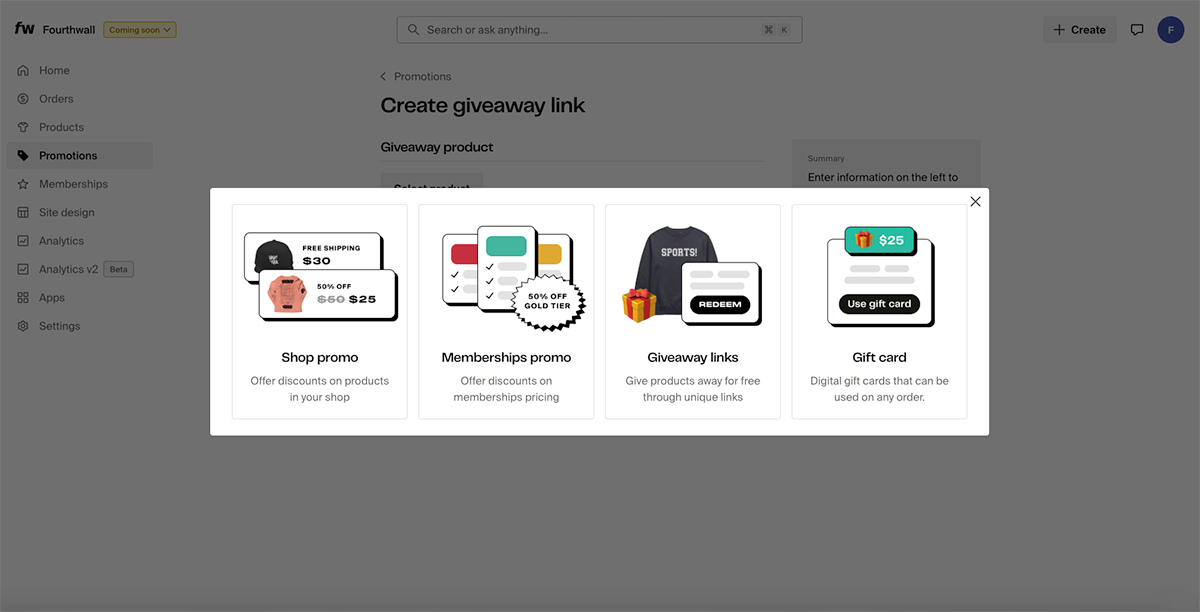
Head to your Fourthwall dashboard and click on Promotions. This is where all discounts, promo codes, and giveaway links live.
Step 2: Create a New Giveaway Promotion
Click Create promotion, then select Giveaway links. This will take you directly to the giveaway creation page, where you’ll configure everything.
Step 3: Select the Product You’re Giving Away
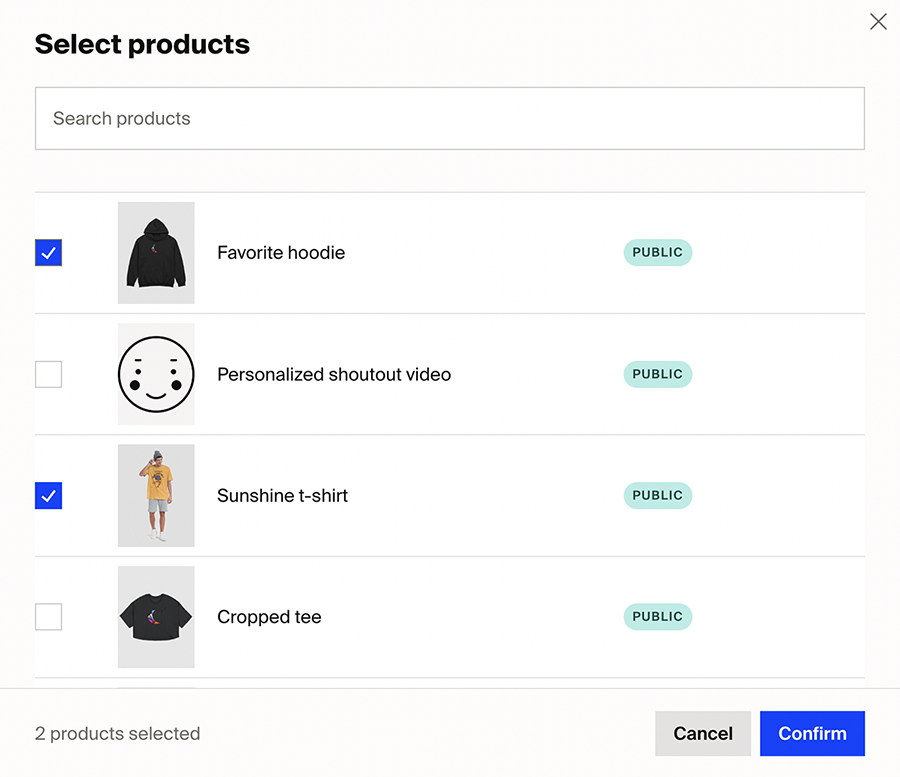
Click Select product and choose the item you want to offer as the giveaway prize.
A few things to know:
- You can select one product per giveaway
- Winners can still choose their size or color (if the product has variants)
- The product can be public or hidden in your shop
Step 4: Confirm Your Product
Scroll through your catalog or use the search bar to find the product faster. Once selected, click Confirm to lock it in.
Step 5: Choose How Many Giveaway Links to Generate
Enter the number of giveaway links you want to create. Each link:
- Is unique
- Can only be redeemed once
- Represents one free item
For example, entering “4” will generate four individual giveaway links—perfect for multiple winners.
Important: Giveaway links cannot be edited after they’re created, so double-check your product and quantity before moving on.
Step 6: Save and Handle Payment Settings
Click Save to generate your giveaway links.
If you haven’t set up a payment method yet, Fourthwall will ask whether you want to:
- Allow redemptions that may result in negative profit, or
- Block redemptions until payment details are added
This gives you complete control over how giveaways impact your margins.
Step 7: Access and Share Your Giveaway Links
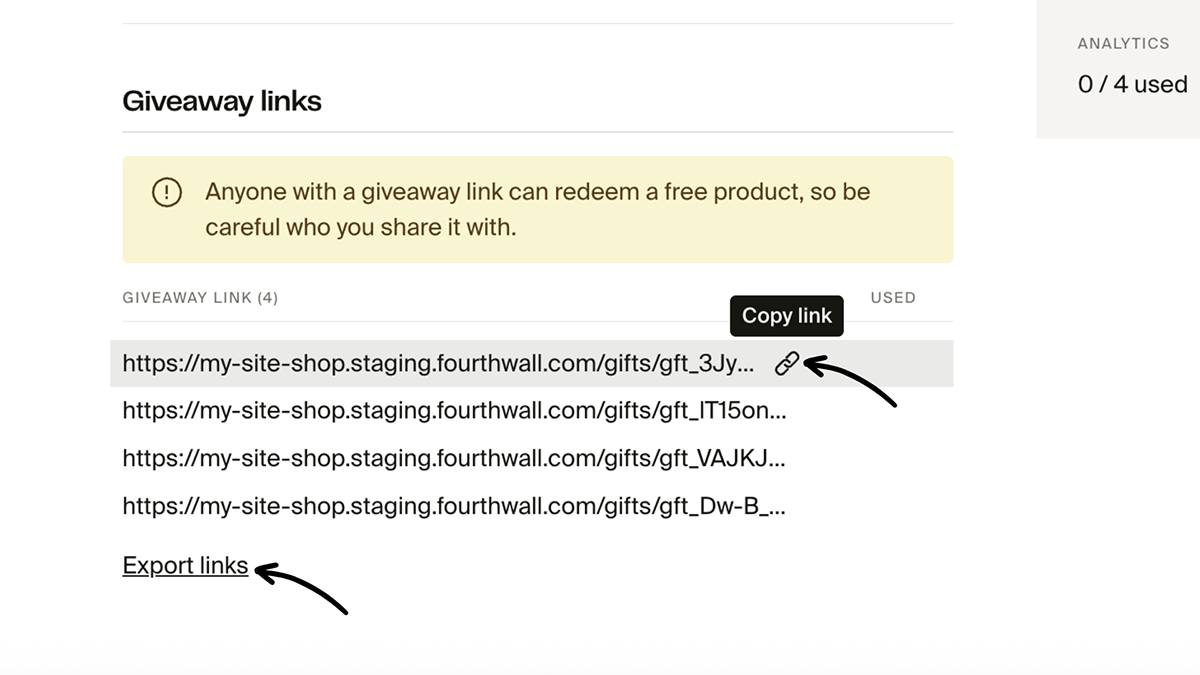
Once generated, your links will appear on the Giveaway Links page.
From here, you can:
- Copy individual links using the link icon
- Export all links as a CSV file for easy sharing, tracking, or email delivery
At this point, you’re ready to send links directly to winners via DMs, email, livestream chat, or wherever you’re running the giveaway.
That’s it. No spreadsheets, no manual fulfillment, no awkward follow-ups. Just clean, one-click giveaways that work seamlessly across Instagram, TikTok, YouTube, Twitch, and beyond.
How to Actually Run a Giveaway That Performs
A giveaway without a plan is just free stuff, but a giveaway with intention is a marketing strategy that boosts engagement, builds real brand awareness, and turns casual followers into an active, invested community.
If you want more entrants, better results, and giveaways that actually move the needle, here’s how to do it right:
Pick the Right Platform (Start Where Your Audience Already Is)
The biggest mistake creators make is running a giveaway where they think it should live, rather than where their target audience is already active. Always pay attention.
- Instagram giveaway: Perfect for driving comments, hashtags, reposts, and user-generated content. A single Instagram post with a strong caption can spike engagement, grow your follower count, and bring new Instagram followers to your profile fast.
- TikTok: Great for reach and buzz. Short-form giveaways feel casual, spread quickly, and are ideal for viral loops.
- YouTube: Use a pinned comment, video description, or Community post to reward subscribers and increase comment activity.
- Twitch: Announce the giveaway live, reward chat engagement, and create hype in real time.
- Email list/newsletter: Email-only giveaways feel exclusive and often convert better than public contests.
If you’re giving away multiple items, cross-posting across platforms makes sense—but always tailor the message to each platform instead of copy-pasting.
Lock in the Rules Before You Announce Anything
Clarity builds trust. Confusion kills participation.
Before posting your giveaway, lock in the logistics and spell everything out clearly. Especially if you’re running an Instagram contest or sweepstakes.
Decide upfront:
- How people enter: comment on a post, follow your account, join your email list, submit a photo contest, or unlock access as a membership perk
- How long it runs: deadlines create urgency and improve engagement
- How winners are chosen: random draw, best comment, UGC-based contest, or members-only
- Where winners are announced: Instagram stories, a pinned comment, email, or livestream
- How the prize is delivered: DM, email, or live on stream using a giveaway link
Clearly communicating the rules helps you avoid skepticism and keeps your audience excited instead of suspicious.
Choose the Right Product to Give Away
You don’t need to give away your most expensive hoodie to make a giveaway effective. The goal isn’t just generosity—it’s creating exposure and momentum for your brand.
High-performing giveaway ideas usually include:
- Stickers
- Hats or beanies
- Tote bags
- Plush toys
- Phone accessories
- Entry-level tees
These items are affordable, easy to ship, and still deliver real value to followers. If you’re choosing multiple winners, keeping costs lean protects your margins.
If it’s a single grand prize, go bigger and build hype around it.
Yes, there’s a short-term cost. However, strong giveaways often lead to:
- New followers discovering your merch
- Higher brand recall and awareness
- Repeat purchases from entrants who didn’t win
- Better conversion on future drops
When planned well, a giveaway becomes more than a simple prize exchange. It creates a moment of excitement that pulls new people into your orbit while giving existing followers a reason to feel appreciated and invested.
By putting your product directly into fans’ hands and encouraging participation, giveaways help reinforce your brand and build loyalty that lasts far beyond the promotion itself.
Start Giving Back to Your Community Today!
Rewarding your community for their support is something every content creator should explore.
Your followers have helped you get to where you are, and it’s important to show them appreciation.
Fourthwall makes it easy by sending giveaway links that create a seamless process for both you and the giveaway winner.
For more information on giveaway links, head to our help center article.
FAQ: Giveaway Links on Fourthwall
How do giveaway links work compared to tools like Easypromos or Woobox?
Unlike third-party tools such as Easypromos, Woobox, or ShortStack, giveaway links let creators deliver prizes directly through their storefront without using a landing page or external picker tools.
Winners redeem the prize through a normal checkout flow, making the process feel professional and seamless.
What’s the best platform to host a giveaway?
The best platform depends on where your audience is most active.
Instagram giveaways work well for comments and hashtags; TikTok giveaways excel at buzz and reach; YouTube giveaways increase comments and watch time; and Twitch giveaways thrive during live engagement.
Email lists are ideal for more exclusive promotions.
How should winners be selected for a giveaway?
Winners can be chosen through a random draw, best comment, or user-generated content contest.
While comment picker tools exist, transparency matters more than the method.
Always explain how the winner is selected and where the announcement will take place to maintain entrants' trust.
What should I include in a giveaway caption?
A strong caption should clearly explain how to enter, what the prize is, how long the giveaway runs, and how the winner will be announced.
Clear instructions reduce confusion, increase engagement, and encourage more Instagram comments and participation from your audience.
Fourthwall is the all-in-one platform that helps Creators sell merch, launch memberships, and build a business around their content, all under their own brand. Posts under this byline come from across the Fourthwall team, drawing on what we learn from powering 200,000+ Creator stores to share practical guidance on merch, monetization, and growing an audience.


You might also like

How Alix Earle Turned GRWM Videos Into a Netflix Series and a Skincare Brand

Making It Together: Inside Evan & Katelyn's Rise From IKEA Hack to Trusted DIY YouTubers

Brett Chody’s Journey to Building a Community One Mile (and One Bite) at a Time

From Actor to ADHD Educator: How Jessica McCabe Turned a Coping Mechanism into a Credible Brand

How Halley Kate Williams Turned a Pet-Brand Venture into a Full Apparel Collection

How Hopescope Built One of YouTube's Biggest Shopping Channels

How Coyote Peterson Created an Extensive Merch Collection Centered on His Content

How LaurenZside Turned Gaming Videos Into a Multi-Business Creator Brand

How Chris Heria Built One of YouTube's Biggest Calisthenics Brands

Keep up with the latest from Fourthwall
New features, product updates, trend breakdowns, and creator stories — straight to your inbox.